Loading...
tech#CGM direct to watch#Dexcom G7 Apple Watch#diabetes smartwatch integration
How to Sync Your CGM Directly to Your Smartwatch: The Ultimate No-Phone-Required Guide
Blood Sugar Control
February 19, 202610 min read

The Freedom of the 'Un-Tethered' Life: Why Direct-to-Watch Matters
If you’ve lived with Type 1 Diabetes for any length of time, you know the "heavy pocket" syndrome. It’s that constant, nagging weight of a smartphone that acts as the literal lifeline between your body and your data. For years, my phone has been my shadow. If I went for a run, the phone came too—strapped to my arm in a sweaty band. If I went to a wedding, the phone was an awkward bulge in my suit jacket. If I jumped in the pool, the phone sat precariously on a towel, hoping to stay within the 20-foot Bluetooth range.
But the landscape of diabetes management is shifting. We are entering the era of the "un-tethered" life.
Direct-to-Watch technology is the holy grail for many of us. To be clear, this is vastly different from the "phone mirroring" we’ve used for years. In a traditional setup, your CGM sensor sends data to your phone, which then pushes a notification or a "mirror" of that data to your watch. If your phone dies or you walk into the other room, your watch goes blank. Direct-to-Watch means the sensor talks directly to the Bluetooth chip in your smartwatch. No middleman. No phone required.
The psychological relief of this cannot be overstated. When I can glance at my wrist during a high-stakes board meeting or in the middle of a heavy set at the gym and see my numbers without pulling out a glowing screen, I feel less like a "patient" and more like a person. Beyond the aesthetics, there are massive safety advantages. For swimmers, surfers, and triathletes, having your glucose data on your wrist while your phone is safely tucked away in a locker is a literal lifesaver.

The Current Landscape: Which CGMs Support Direct Connection?
As of mid-2024, the "Direct-to-Watch" club is exclusive, but it’s growing fast.
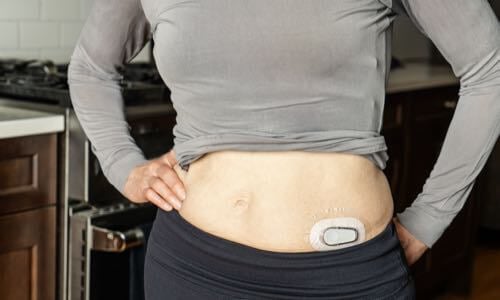
The undisputed leader right now is the Dexcom G7. In a landmark update, Dexcom became the first official CGM manufacturer to support a direct Bluetooth link to the Apple Watch. This was the feature that launched a thousand upgrades; for the first time, the Apple Watch acts as the primary receiver.
The FreeStyle Libre 3, while arguably the smallest and most discreet sensor on the market, is still lagging in official direct-to-watch support. Currently, Abbott requires the phone to be the primary receiver. However, the diabetes "hacker" community—a group I am proud to be a part of—has developed ingenious workarounds using third-party apps to bridge this gap.
The secret sauce behind all of this is Bluetooth Low Energy (BLE). Modern sensors are now powerful enough to maintain multiple "bonds." For example, a Dexcom G7 can simultaneously talk to your insulin pump, your smartphone, and now, your smartwatch.
Step-by-Step: Setting Up Dexcom G7 Direct-to-Watch on Apple Watch
If you are a Dexcom G7 user, you are sitting on a goldmine of convenience. Here is how you unlock it.
1. Check Your Hardware
You can’t run this on an ancient wearable. You need an Apple Watch Series 6 or later, an Apple Watch SE (2nd Gen), or any Apple Watch Ultra. Your watch must be running watchOS 10 or later, and your iPhone needs to be on at least iOS 17.
2. Update the Dexcom G7 App
Ensure your G7 app is updated to the latest version via the App Store. Open the app on your phone and navigate to Settings > Direct to Watch.
3. The Pairing Dance
When you hit "Enable," the app will prompt you to pair the sensor with your watch. This is where people often get stuck. You aren't pairing the watch to the phone; you are pairing the sensor to the watch.
- Keep your watch close to your sensor.
- Check the Bluetooth Settings on your Apple Watch (not your phone).
- You should see the Dexcom sensor appear as a peripheral device.
4. Troubleshooting the 'Signal Loss'
It is common to see a "Signal Loss" alert during the first 15 minutes. This is usually just the sensor and watch negotiating their new relationship. Stay patient. If it persists, toggle the Bluetooth on your watch off and back on.

The Garmin Ecosystem: A Favorite for Diabetes Athletes
While Apple owns the lifestyle market, Garmin owns the athlete space. If you are a marathoner or a cyclist, you know that Apple Watch battery life just doesn't cut it.
Garmin doesn’t technically use a "Direct-to-Sensor" connection in the same way Apple does—yet. Instead, they utilize the Garmin Connect IQ store.
- The Dexcom Data Field: This allows you to see your blood sugar inside your actual workout screen. You can see your pace, heart rate, and glucose all in one view.
- The Dexcom Widget: This is for your daily watch face.
For the "off-grid" runner, Garmin users often rely on Dexcom Share. However, if you are using a phone-free Garmin setup, you’ll likely be using a "Master" device like a phone in a backpack, but the integration is so seamless it feels direct. For those using the Dexcom G6, there are community-made "Direct-to-Garmin" data fields that bypass the cloud, provided you have a compatible bridge.

Android Users: Samsung Galaxy Watch and Wear OS Solutions
Android users have long been the pioneers of DIY diabetes tech. If you’re rocking a Samsung Galaxy Watch 6 or any Wear OS 4 device, your path to direct-to-watch is a bit more "adventurous."
Currently, the official Dexcom G7 app for Android is more restrictive than its iOS counterpart regarding direct-to-watch. However, the community has created the BYODA (Build Your Own Dexcom App). This is a modified version of the Dexcom app that strips out compatibility checks and allows for much broader data sharing.
By using BYODA in tandem with an app called G-Watch Wear, you can push your glucose data to almost any Wear OS watch face as a "complication." It’s not a true "Phone-Free" direct link in the official sense, but for many Android users, it’s the only way to get real-time data on the wrist without the official app's lag.

The 'Hacker' Route: Using Nightscout and Bluejay for Libre Users
For my FreeStyle Libre 3 users, the official path is narrow. But where there is a will, there is a "hacker."
The most robust phone-free solution for Libre users is the Bluejay GTS watch. This is a smartwatch designed specifically for people with diabetes. It doesn't try to be an Apple Watch; it tries to be a CGM receiver that lives on your wrist.
Using an app like Juggluco (for Android) or xDrip+, you can "capture" the Libre 3 Bluetooth stream. These apps can then be configured to treat the Bluejay GTS as a direct collector.
- Pros: True phone-free freedom for Libre users; incredible battery life; high-contrast "always-on" display.
- Cons: It requires a bit of technical setup; you’re using non-official software for medical decisions.
As someone who has used xDrip+ for years, I can tell you the level of customization—setting alerts that actually wake you up—is unparalleled.

Battery Life and Connectivity: Managing the Trade-offs
Direct-to-watch is a miracle, but it isn't free.
The Battery Drain
Bluetooth is a power-hungry protocol. When your watch becomes the "collector," it is constantly listening for the sensor's "ping" every 5 minutes. On an Apple Watch, you might notice a 10-15% faster battery drain than usual. Tip: Turn off "Background App Refresh" for apps you don't need to save juice for your CGM.
Maintaining the Link
The human body is essentially a giant bag of water—and Bluetooth hates water. If your watch is on your left wrist and your sensor is on the back of your right arm, your body can actually block the signal. Tip: Try to wear your watch on the same side of the body as your sensor for the most stable connection.
Back-filling Data
What happens when you get back to your phone? The Dexcom G7 is smart. It stores up to 24 hours of data. Once you are back in range of your phone, the sensor will "back-fill" all the data you missed on your phone's health app, ensuring your doctor still sees the full picture.
Optimizing Your Watch Face for Quick Glances
The goal of direct-to-watch is to spend less time looking at tech. To do this, you need to optimize your watch face.
- The Power of Complications: Don't just use the Dexcom app; use the "Complication" (the little widget on the watch face). You want to see your number and your trend arrow without tapping anything.
- Always-On Display: If your watch supports it, enable "Always-On." Being able to glance at your wrist while holding a grocery bag or driving a car is a game-changer.
- Discrete Haptics: Set your "High" alerts to a subtle vibration. This allows you to stay informed without your watch screaming at you in a quiet movie theater.

The Future: What’s Next for Wearable Diabetes Tech?
We are just scratching the surface. The rumors of non-invasive glucose monitoring (using lasers or sensors that don't pierce the skin) in the Apple Watch Series X or future Samsung models continue to swirl. While that tech is likely still a few years from being "medical grade," it shows where the industry is heading.
The next frontier? Wrist-based pump control. Imagine not only seeing your sugar on your watch but also being able to bolus for a slice of pizza directly from your wrist. With the Tandem Mobi and various "Loop" DIY systems, we are closer than ever to the watch being the "brain" of the entire artificial pancreas.
Conclusion: Embracing the Tech-Forward Diabetes Lifestyle
Living with diabetes is a 24/7 job that we never applied for and can never quit. But technology like Direct-to-Watch syncing shifts the power dynamic. It takes the "burden" of monitoring and turns it into a seamless part of our digital lives.
Whether you are an Apple devotee, a Garmin athlete, or a DIY Android tinkerer, I encourage you to try going phone-free. Go for a walk without your phone. Go to the gym with just your watch. Feel the lightness of your pockets and the clarity of having your data exactly where you need it: right on your wrist.
Technology is the tool, but you are the pilot. Fly free!
Are you ready to cut the cord? Let us know in the comments which watch/CGM combo you’re currently using!